
Digital Team
IT Specialist
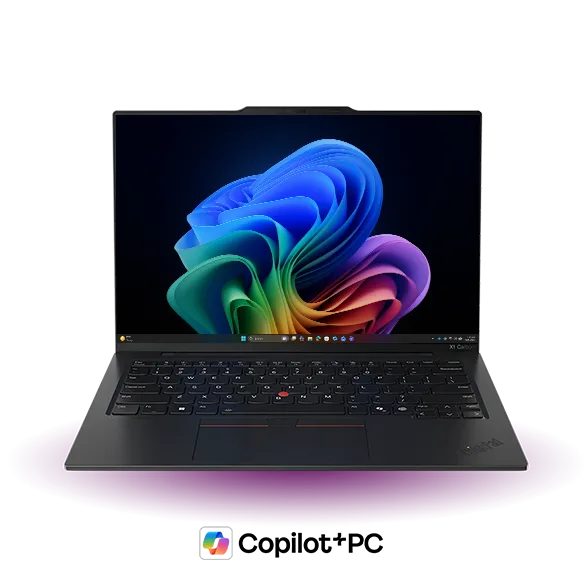
Choosing the right laptop is a strategic decision for small and medium-sized enterprises (SMEs). It not only affects daily work productivity but also impacts data security and the operational efficiency of the entire system. The Lenovo ThinkPad X1 Carbon Gen 13 Laptop, with its powerful configuration and optimized design, is a strong contender for many types of businesses.
This article will analyze specific scenarios and requirements where a business should consider investing in this laptop series, rather than just focusing on technical specifications.
1. High Performance Requirements for Demanding Work
Does your business have roles that require continuous multitasking or running intensive applications? The ThinkPad X1 Carbon Gen 13 is equipped with a configuration to meet these needs.
Processing and Multitasking Performance
With an Intel Core Ultra 7 258V processor and 32 GB LPDDR5X-8533 RAM, the X1 Carbon Gen 13 delivers superior performance, ensuring smooth handling of heavy multitasking workloads. This is an ideal choice for:
- Programmers and Software Engineers: Who need to compile code, run virtual machines, and use complex integrated development environments (IDEs).
- Data Analysts: Who process large datasets, run statistical models, or data visualization software.
- Project Managers and Financial Professionals: Who frequently work with multiple applications simultaneously, complex spreadsheets, and project management tools.
The 32GB LPDDR5X-8533 RAM not only helps applications run faster but also ensures seamless switching between tasks without lag, optimizing work time.
Storage and Data Access Speed
A 1 TB SSD M.2 2280 PCIe drive provides extremely fast data read/write speeds, allowing the operating system to boot, applications to open, and large files to be accessed in an instant. This is especially crucial for businesses that need to:
- Minimize employee waiting times.
- Support applications requiring high storage bandwidth.
- Ensure data is stored securely and efficiently.
2. Prioritizing Mobility and Premium User Experience
If your team frequently travels, works remotely, or needs a device that conveys professionalism, the X1 Carbon Gen 13 is a suitable choice.
Thin and Light Design with Touchscreen Display
The signature thin and light design of the X1 Carbon series makes it easy for users to carry when traveling for business, meeting clients, or working flexibly from various locations. The 14" WUXGA (1920 x 1200) Touch display not only provides ample workspace with high resolution but also integrates touch capability, offering convenience in situations such as:
- Presentations and product demos: Easily interact directly on the screen.
- Quick note-taking: Use a stylus (if supported) to jot down notes or sketch ideas.
- Optimized user experience: Especially for those familiar with touch interfaces on mobile devices.
Efficient Connectivity and Communication
With WF BE201+ BT wireless connectivity, the X1 Carbon Gen 13 ensures stable and high-speed internet connection, along with easy Bluetooth connectivity to peripherals. The 1080P FHD RGB+IR camera provides sharp image quality for online meetings, interviews, or remote communication with partners, which is increasingly important in today's modern work environment.
3. Standard Security and Business Support Needs
Data security and operational stability are vital factors for any business. The X1 Carbon Gen 13 is designed to meet these requirements.
Integrated Security Features
- Fingerprint Reader: Provides a secure and convenient biometric authentication method, helping protect data from unauthorized access.
- Windows 11 Pro: This operating system version integrates numerous enterprise-grade security features such as BitLocker for disk encryption, Windows Information Protection (WIP) to prevent data leakage, and management capabilities via Group Policy.
Reliability and Premium Support Services
The 3 Cell 57Wh battery provides long usage time, allowing users to work continuously without worrying about running out of power. Notably, 3Y Premier Support is a significant advantage for small and medium-sized businesses. This service ensures:
- Reduced burden on internal IT teams: In case of an issue, FA Tech will coordinate with the manufacturer for quick resolution, minimizing device downtime.
- Priority technical support: Access to experienced technical experts, helping diagnose and resolve issues more effectively.
- Guaranteed continuous operation: Helps businesses maintain productivity and avoid work interruptions due to hardware problems.
What Does FA Tech Support?
FA Tech provides workstation infrastructure deployment and management services, including selection consultation, supply, and installation of devices such as the Lenovo ThinkPad X1 Carbon Gen 13 Laptop, ensuring seamless integration into your business's existing IT system.
View detailed specifications for the Lenovo ThinkPad X1 Carbon Gen 13 Laptop